Product Overview
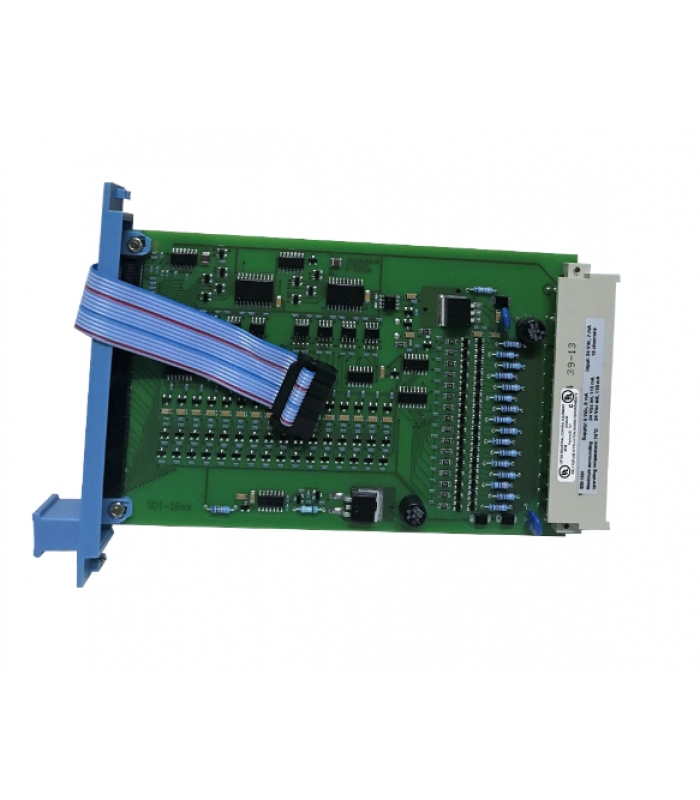
The Honeywell FC-SDI-1624 is an industrial-grade digital input field termination assembly designed for robust signal conditioning and signal transmission in harsh industrial environments. It provides 16 independent input channels, each supporting 24V DC voltage input.
Key Features
- 16 safe digital input channels
- Enhanced safety integrity: Certified to SIL 2 per IEC 61508
- Redundant signal processing with 99% fault coverage
- Continuous channel health monitoring
- Built-in diagnostics for open circuits, short circuits, and overvoltage conditions
- Compact and rugged construction for harsh industrial environments
Applications
The FC-SDI-1624 is ideal for various industrial applications requiring high reliability and precision, including:
- Manufacturing lines
- Environmental monitoring systems
- Machine guard interlocks
- Access control systems
- Alarm systems
- Safety-critical industrial processes
Installation Guide
CAUTION: Before installing the FC-SDI-1624 module, ensure that power is disconnected from the system to prevent electrical shock or damage to equipment.
1. Preparation
- Ensure the DIN rail is mounted in a dust-free, vibration-free enclosure
- For hazardous areas, use an explosion-proof enclosure
- Verify ambient temperature range: -40°C to +70°C
- Prepare 24V DC power supply (isolated, fused at 2A, and grounded)
- Prepare 0.75 mm² shielded twisted-pair cables for input connections
2. Mounting the Module
- Align the module with the DIN rail
- Use a torque wrench set to 1.0 Nm to secure the module
- Ensure proper spacing between modules for ventilation (minimum 50mm)
3. Wiring Connections
Follow these steps to wire the FC-SDI-1624 module:
- Connect the 24V DC power supply to the PWR+ and PWR- terminals
- For each input channel (1-16), connect the field device to the corresponding terminals
- Ground the shield of the input cables at the module end
- Route signal cables separately from power lines to minimize interference
- Label each channel with the connected device (e.g., "ES-201 Stop Button")
NOTE: For 32-point digital input modules, you must use two FC-SDI-1624 termination panels. Each panel comes with two sets of labels: 1-16 and 17-32.
4. Post-Installation Check
- Verify all connections are secure and correct
- Ensure cable routing follows best practices
- Confirm all labels are correctly applied
- Check that the enclosure is properly sealed
Configuration Guide
Software Requirements
The FC-SDI-1624 module is configured using Honeywell's Safety Builder software. Ensure you have the following:
- Safety Builder software (version 5.0 or later)
- Compatible Windows operating system (Windows 10 or later)
- USB or Ethernet connection to the module
Basic Configuration Steps
- Launch Safety Builder software
- Create a new project or open an existing one
- Add the FC-SDI-1624 module to your project
- Configure module parameters:
- Channel names and descriptions
- Input type (sourcing/sinking)
- Debounce time (default: 10ms)
- Fault detection thresholds
- Alarm settings
- Save the configuration
- Download the configuration to the module
- Verify the configuration by testing input signals
Advanced Configuration
For advanced applications, you can configure:
- Redundancy settings
- Diagnostic algorithms
- Diagnostic parameters
- Communication protocols (Modbus, Ethernet/IP, etc.)
NOTE: After configuration, always back up your settings to a secure device. This will facilitate quick recovery in case of module replacement.
Integration with Control Systems
The FC-SDI-1624 can be integrated with various control systems:
- Honeywell Experion PKS
- Other DCS systems via standard communication protocols
- PLC systems (Allen-Bradley, Siemens, etc.)
Troubleshooting Guide
NOTE: Before troubleshooting, always ensure that power is disconnected from the system to prevent electrical shock or damage to equipment.
Common Issues and Solutions
1. No Power Indication
- Check power supply connections
- Verify 24V DC power supply is active
- Check power supply fuse (2A)
- Inspect for damaged power terminals
2. Input Channel Not Responding
- Check field device connection
- Verify input signal is within specified range (24V DC)
- Inspect channel fuse (if applicable)
- Check for open or short circuits in wiring
- Verify configuration settings for the channel
3. Communication Errors
- Check Ethernet/USB cable connections
- Verify network settings
- Check for IP address conflicts
- Inspect communication port for damage
- Restart the module and try again
4. Fault Alerts
- Check Safety Builder software for specific fault codes
- Inspect for open circuits, short circuits, or overvoltage conditions
- Verify all wiring connections
- Check for electromagnetic interference
- Run diagnostic tests using Safety Builder software
Diagnostic Procedures
- Connect to the module using Safety Builder software
- Navigate to the Diagnostics tab
- Run a full system diagnostic scan
- Review diagnostic results for any issues
- Follow recommended actions for any detected problems
Maintenance Schedule
- Monthly: Visual inspections for loose terminals or corrosion
- Quarterly: Test input channels using a signal generator or test switch
- Monthly: Run diagnostic scans using Safety Builder software
- Annually: Calibrate response time using an oscilloscope
- As needed: Replace fuses or other components as required
IMPORTANT: Use only Honeywell-certified spare parts to maintain SIL 2 integrity and system reliability.
Interactive Connection Diagram
Signal Flow Explanation
The FC-SDI-1624 module processes signals in the following sequence:
- Field devices (sensors, switches, etc.) send input signals to channels 1-16
- Signals are conditioned and processed by the module's internal circuitry
- Processed signals are transmitted to the control system
- Built-in diagnostics continuously monitor channel health and signal integrity
Connection Details
Power Supply Connections
The module requires a 24V DC power supply connected to the designated power terminals (PWR+ and PWR-).
- Power supply must be isolated
- Use a 2A fuse for overcurrent protection
- Ensure proper grounding to minimize noise
Input Channel Connections
The module provides 16 input channels for connecting field devices:
- Use 0.75 mm² shielded twisted-pair cables
- Ground the shield at the module end
- Each channel is protected by a fuse with blown-fuse indicator
- Route signal cables separately from power lines
Communication Interface
The module includes a communication interface for configuration and data transmission:
- RS-485 interface for serial communication
- Ethernet port for network communication (on selected models)
- Supports standard industrial protocols
NOTE: For detailed wiring diagrams specific to your application, refer to the Honeywell FC-SDI-1624 Installation Manual or consult with Honeywell technical support.
Honeywell FC-SDI-1624 Digital Input Module - Technical Documentation
© 2025 Honeywell International Inc. All rights reserved.
For additional support, contact Honeywell Technical Support at +1-800-537-6945